Granny 3
- 4.2
- Rating
- 100.00M
- Installs
- Free
- Price

 Analysis by App-foxy
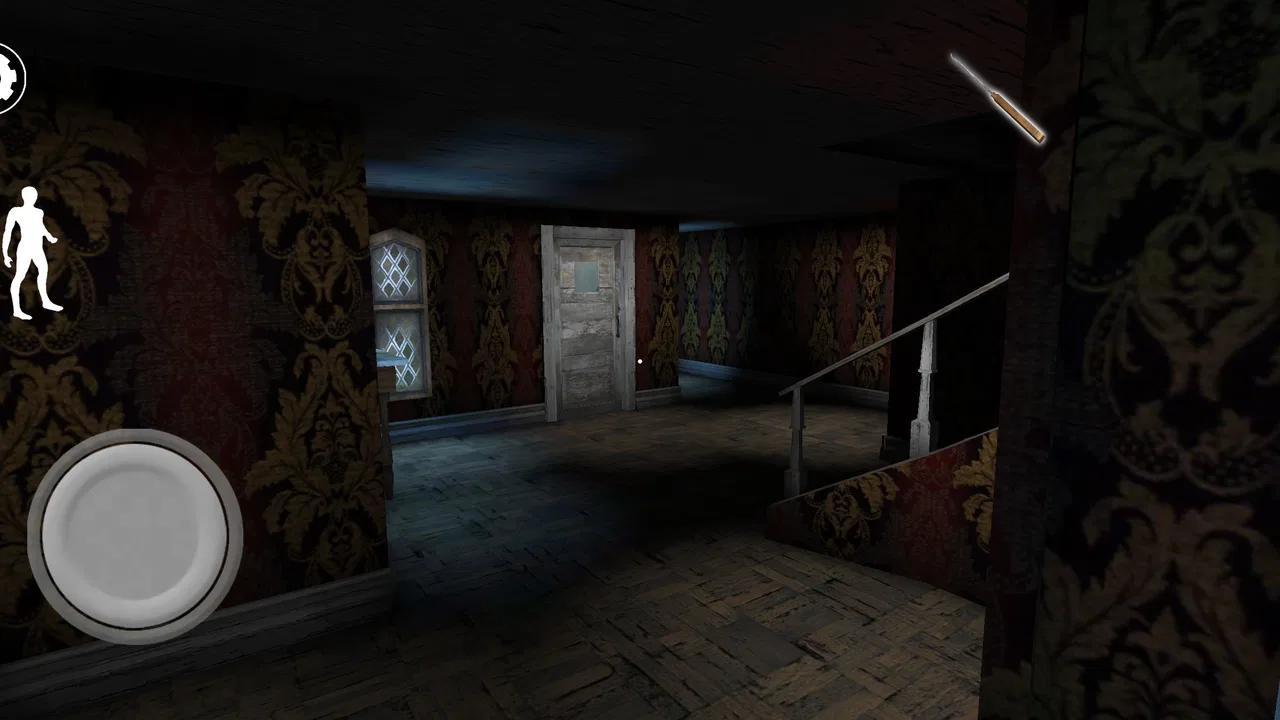
Granny 3 is the kind of arcade horror game I open when I want a tense, focused challenge rather than a relaxed few minutes of play. Its basic idea is immediately uncomfortable: a new household has been established, and I have to explore, solve problems, and stay alive while danger can appear from several directions. The result is a game that rewards patience more than speed, and careful observation more than button mashing.
Developed by DVloper, it is free to play and aimed at a Teen audience. The game launched on June 3, 2021, and the current version is 1.2.2, with support for devices running Android 6.0 or later. Its arcade classification is useful because this is not a long, story-heavy adventure in the usual sense. The focus is on repeated attempts, learning the environment, and improving your decisions each time you play.
Its popularity is easy to understand: the game has passed 100 million installs, carries a 4.2 average from roughly 596 thousand ratings, and has about 5.1 thousand written reviews. Those figures suggest a large audience, but they do not make the game suitable for everyone. I found that its strongest appeal comes from players who enjoy pressure, trial and error, and the satisfaction of finally understanding a threatening space.
You May Also Like

 Blood Strike: 2.5 Anniversary
Blood Strike’s Loadouts Turn Every Drop Into a Tactical Gamble
A close look at Blood Strike’s custom loadouts: how fast access to signature weapons reshapes its battle royale rhythm, rewards preparation, and narrows the gap between fights.

 Pandora - Music & Podcasts
Pandora’s Music Is Easy to Start, but Harder to Recover
Pandora’s strength is its low-effort path from a seed to a station. Its weak spot is how much confidence it asks you to place in connection, setup, and quiet recovery.

 8 Ball Pool
 Is Built on Rivalries, Rematches, and Routine
A close look at the rivalries, rematches, shared routines, and unanswered safety questions that turn a quick pool match into a persistent mobile community.

 Samsung Music
’s Quiet Strength Is Playing What You Already Own
Its reach comes less from spectacle than from dependable access to a personal library. That simplicity is both the app’s strongest retention engine and its ceiling.

 AccuWeather: Weather Radar
AccuWeather Review: A Quick, Clear Forecast for Everyday Decisions
For everyday plans, the best forecast is the one you can understand quickly. AccuWeather makes rain timing, radar, and local conditions easy to act on, with a few trade-offs.

 Hill Climb Racing
Why Hill Climb Racing Still Turns Crashes Into One More Run
A tiny car, a bumpy hill and one more upgrade: Hill Climb Racing keeps resurfacing because its simple chaos makes every near-miss feel personal.
More From Our News Desk
View All News


Where players usually get stuck
I find that players usually get stuck when they treat the first minutes like a race instead of a chance to observe. In this section, I’d focus on how to spot the habits that turn uncertainty into avoidable risk, then build a small plan before moving on. That distinction matters because the next step is checking whether a frustrating run comes from setup rather than decision-making.
The first minutes are deliberately confusing
My first practical lesson was not to rush. The opening moments can encourage panic, especially when I was still learning how movement, hiding, searching, and escape routes fit together. In a conventional arcade game, I might immediately look for the fastest action. Here, that approach usually creates noise, wastes time, or sends me into an area I have not properly checked.
The household is best treated as a puzzle that must be mapped mentally. I began by noticing doors, corners, rooms that connected to one another, and places where I could safely pause. That sounds simple, but it changes the entire experience. Instead of wandering until something happens, I started making short plans: inspect one area, remember what I saw, and leave with a clear reason for the next move.
The most useful early habit is to learn the route before trying to complete it. I do not mean memorizing every detail in one attempt. I mean identifying a few reliable landmarks and understanding which paths feel exposed. This reduces the biggest source of frustration: reaching an important object but having no idea how to return safely.
Noise and panic create avoidable mistakes
One of the less obvious difficulties is that fear changes how I play. When danger feels close, I make careless movements, check the same place repeatedly, or abandon a good plan too soon. The game becomes much more manageable when I separate observation from action. I first decide where I want to go, then move there with a purpose instead of reacting to every sound or visual surprise.
That approach is especially helpful for short sessions. If I only have a few minutes, I do not try to force a complete escape or a perfect run. I use the session to learn one section of the home, test a route, or understand what caused an earlier failure. This turns an unsuccessful attempt into progress rather than wasted time.
Why repeated attempts feel meaningful
Granny 3 is built around the idea that failure teaches you something. A lost attempt can reveal a safer direction, show that a particular approach is too slow, or make an important room easier to recognize next time. The game does not need a complicated progression system to create motivation; the player’s own memory becomes the main form of advancement.
That design will appeal to people who enjoy repeating a challenge with better information. It will frustrate players who expect constant forward progress, generous hints, or a straightforward sequence of objectives. I would not recommend it to someone who dislikes restarting after a mistake, because learning through failure is not a minor part of the experience. It is the central rhythm.
Setup checks before blaming the game
Before I change settings or reinstall anything, I like to check the simple things that affect a touch-controlled game: a steady grip, a clean screen, and enough attention to notice how movement responds. This section covers those practical checks without confusing ordinary learning friction with a technical fault. Once the basics feel consistent, it becomes easier to decide how to use a failed attempt productively.
Start with the device and installation basics
Because the game supports Android 6.0 and later, the first sensible check is whether the phone or tablet meets that minimum. A device that technically runs a game can still feel uncomfortable if it is busy with other tasks, short on free storage, or struggling with general performance. Before judging the controls, I would close unnecessary apps, restart the device, and make sure the installation has finished properly.
These are ordinary steps, but they matter more in a game where timing and awareness are important. A delayed response can feel like a gameplay mistake even when the real problem is the device. I prefer to test the game after a fresh restart, with the screen clean and the phone held in a stable position. That gives me a fairer impression of movement and touch response.
Give the controls a short adjustment period
Touch controls can feel less precise than physical buttons, particularly when I am moving quickly while trying to look around. My practical solution is to spend the first attempt learning the relationship between movement and camera control instead of treating that run as a serious escape attempt. I make small turns, stop deliberately, and check whether my thumb is covering part of the screen or causing accidental input.
This is also why I avoid playing while walking, commuting, or holding the phone with one hand. The game demands attention, and an unstable grip makes narrow turns and quick decisions harder. A quiet place and both hands available make a noticeable difference, even though they do not change the game itself.
Check the basics when the game will not behave normally
If the application closes, freezes, or refuses to load correctly, I would begin with general troubleshooting rather than immediately assuming the gameplay is broken. I would confirm that the operating system is supported, restart the device, check the installation, and try again without other demanding applications running. If the problem continues, reinstalling may be worth considering, but I would only do that after thinking about any local progress that might be affected.
I also recommend avoiding rushed changes during a difficult run. If the game is working but the player is simply losing often, reinstalling will not solve the real issue. It is better to distinguish a technical failure from a design that intentionally punishes poor timing. That distinction saved me from treating normal challenge as a malfunction.
How the free model affects the decision
The game is free, which makes it easy to try without committing money first. That is a real advantage for curious players who want to discover whether this style of horror suits them. At the same time, free access should not be confused with a gentle experience. The absence of an upfront price does not remove the need for patience, and the Teen rating is a useful reminder that the atmosphere and threat may not be comfortable for younger players or anyone sensitive to horror tension.
I would also advise trying it in a setting where concentration is possible. A free game is not necessarily a good choice for every spare moment. If I want something calming while waiting in a queue, this would be a poor match. If I want a focused challenge that can occupy a short, intense session, it makes much more sense.
Recovering after a failed attempt
After a failed attempt, I try to carry one useful observation into the next run rather than replaying the same approach out of habit. This section looks at how to turn a loss into a small experiment, such as changing one route or slowing down at a point where I usually rush. With that mindset in place, the following section considers cases where the source of trouble may be outside the game itself.
Turn every loss into a small investigation
When I fail, I ask one specific question: what information did that attempt provide? Perhaps I entered a room without an exit plan. Perhaps I spent too long searching one location. Perhaps I used a familiar route even though it had become predictable. Naming the mistake helps me change one behavior on the next attempt instead of repeating the entire run with the same habits.
A useful recovery workflow is to divide an attempt into three stages. First, explore enough to identify a safe mental map. Second, test one route or objective without trying to do everything. Third, combine what worked while removing the risky step. This method feels slower than improvising, but it produces more reliable progress and reduces the emotional effect of a sudden failure.
Use memory instead of frantic searching
My strongest improvement came from remembering locations and connections rather than trying to remember every detail. I note which areas are close together, where I tend to hesitate, and which direction I instinctively choose when surprised. That last point is important: fear often sends me toward the first familiar place, not the safest one.
For a practical everyday scenario, imagine playing after dinner with only fifteen minutes available. I would spend the first session learning the nearby layout, the second testing a single movement plan, and the third attempting a fuller run. This is more satisfying than repeatedly restarting with no goal, and it works well for players who cannot dedicate a long uninterrupted evening to the game.
When persistence stops being productive
There is a difference between a demanding challenge and a session where I am no longer learning. If I make the same mistake several times while becoming increasingly irritated, I take a break. Horror games rely on attention, and tired attention turns small control errors into repeated losses. Returning later often helps more than forcing another attempt immediately.
This is also where the game differs from gentler arcade alternatives. A casual reflex game may let me improve through quick repetition without much planning. Granny 3 asks me to remember, observe, and manage nerves. Players who want instant feedback and constant movement may prefer a faster arcade title, while players who enjoy suspenseful problem solving will likely appreciate this slower form of pressure.
When the app is not the real cause
Sometimes the game gets blamed for a problem that starts with the device, installation, or the way I am playing at that moment. Here, I’d separate those possibilities by checking whether the issue repeats under calmer, more consistent conditions before changing anything major. That makes the final decision clearer: whether to keep troubleshooting, adjust my approach, or choose a different kind of game.
Performance problems can be misleading
If movement feels delayed, I first consider the device environment. Background activity, heat, low available space, or an aging phone can affect many games, not just this one. Testing after a restart and comparing the behavior across a quiet session can help separate a temporary device issue from a consistent problem with the game.
I also pay attention to whether the difficulty appears only during frantic moments. A player may describe a missed turn as lag when the real cause is an overlarge camera movement or an unfamiliar control gesture. Slowing down during practice makes that easier to identify. Once I understand the control response, I can decide whether the limitation is technical or simply part of the learning curve.
Connectivity assumptions can cause unnecessary confusion
Not every problem that appears around a game is caused by the game itself. Store installation issues, interrupted downloads, account synchronization, or device-level restrictions can interfere before normal play even begins. I handle those separately from gameplay troubleshooting and avoid changing several settings at once, because that makes it difficult to know what actually helped.
For a player deciding whether to keep the game, the more useful test is consistent play on a supported device after the basic setup is clean. If the application launches and responds normally, the next question is whether its horror-and-puzzle rhythm is enjoyable. No technical adjustment will make a deliberately tense game feel relaxing if that is not the experience someone wants.
Who should choose something else
I would skip this game if I want a story that carries me forward, a forgiving checkpoint structure, or a simple arcade loop that can be understood instantly. I would also choose another option for children, since the Teen content rating makes it unsuitable as a casual pick for a young child. Someone who dislikes being startled, repeating attempts, or learning through failure may find the tension exhausting rather than entertaining.
On the other hand, it is a strong fit for players who enjoy exploring a threatening environment, building a route in their head, and gradually replacing panic with control. It works particularly well for people who like watching their own decision-making improve. The satisfaction comes less from collecting rewards and more from recognizing a situation that once caused failure and handling it calmly.
My practical verdict after playing
I see Granny 3 as a focused arcade horror challenge with a clear identity. Its free entry, large audience, and modest Android requirement make it easy to try, but its real appeal is narrower than those facts suggest. This is not a background game. It asks for attention, patience, and a willingness to repeat an attempt until the environment begins to make sense.
DVloper has created an experience where setup matters, but disciplined play matters more. Learning the layout, keeping a route in mind, and reviewing each failure are more valuable than rushing toward an uncertain objective. Those habits also make the game feel fairer, because improvement comes from information rather than luck alone.
My recommendation is simple: try it if you want tense exploration in short, repeatable sessions and do not mind being punished for careless decisions. Approach it with a plan, give the controls time to settle, and treat early losses as reconnaissance. If you want a cheerful, effortless arcade distraction, choose something else. If you enjoy the moment when a frightening place becomes understandable, Granny 3 is worth installing and learning at your own pace.
FAQs for Granny 3
01What is Granny 3 all about?
Granny 3 is a horror survival game where players are trapped in a creepy house and must use stealth and strategy to escape. The game features a terrifying atmosphere, with multiple levels of difficulty and various puzzles to solve. Players must avoid Granny and her family, who are constantly on the lookout.
02What platforms is Granny 3 available on?
Granny 3 is available for both Android and iOS devices. It can be downloaded from the Google Play Store for Android users and the Apple App Store for iOS users. The game is optimized for touch controls, providing an immersive experience on mobile devices.
03Does Granny 3 require an internet connection to play?
No, Granny 3 does not require an internet connection to play. It is a single-player game that can be enjoyed offline, making it perfect for gaming on the go. However, connecting to the internet may be necessary for downloading updates or accessing certain online features.
04Is Granny 3 suitable for all ages?
Granny 3 is rated for mature audiences due to its horror elements, including jump scares, creepy visuals, and intense gameplay. It is not recommended for young children or those who are easily frightened. Parents should review the content to determine if it's appropriate for their children.
05What are the system requirements for Granny 3?
For Android, Granny 3 requires a device running Android 5.0 or higher. For iOS, it requires iOS 9.0 or later. The game is compatible with most modern smartphones and tablets, but for the best experience, a device with good processing power and graphics capability is recommended.
Pros
- Engaging horror atmosphere and storyline.
- Challenging puzzles keep players intrigued.
- Simple controls enhance accessibility.
- Regular updates with new content.
- Offline play available for convenience.
Cons
- Graphics may feel outdated to some users.
- Limited replayability after completion.
- Sound effects can be repetitive.
- Occasional glitches affect gameplay.
- Not suitable for younger audiences.

Granny 3
Gallery